Attributes in JS
Attributes in JavaScript are used to store the values of an object. They are also known as properties of an object. They are used to store the values of an object. They are also known as properties of an object. Attributes are key-value pairs inside HTML tags (e.g., id, class, href, src).
1. Accessing Attributes
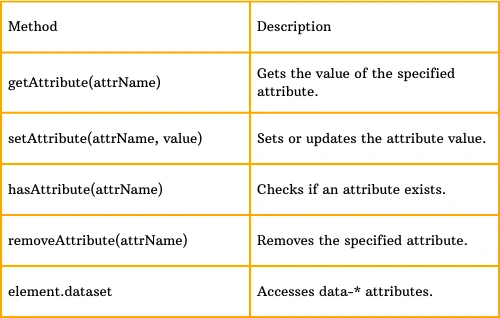
JavaScript provides several methods to interact with attributes.
1.1 getAttribute()
    <img id="image" src="pic.jpg" alt="Sample Image">

      <script>
        let imgElement = document.getElementById("image");
        console.log(imgElement.getAttribute("src")); // Output: pic.jpg
        console.log(imgElement.getAttribute("alt")); // Output: Sample Image
      </script>
1.2 setAttribute()
    <img id="image" src="pic.jpg" alt="Sample Image">

      <script>
        let imgElement = document.getElementById("image");
        imgElement.setAttribute("src", "new-pic.jpg"); // Changes the image source
        imgElement.setAttribute("alt", "New Image"); // Changes alt text
      </script>
1.3 hasAttribute()
    <img id="image" src="pic.jpg">

      <script>
        let imgElement = document.getElementById("image");
        console.log(imgElement.hasAttribute("src"));  // Output: true
        console.log(imgElement.hasAttribute("alt"));  // Output: false
      </script>
1.4 removeAttribute()
    <img id="image" src="pic.jpg" alt="Sample Image">

      <script>
        let imgElement = document.getElementById("image");
        imgElement.removeAttribute("alt"); // Removes the alt attribute
      </script>
Result:
The alt attribute is removed, so the image won't have alternative text anymore.
2. Working with dataset attributes (data-*)
HTML allows custom attributes prefixed with data-, which can be accessed using JavaScript.
    <button id="btn" data-user="JohnDoe" data-role="admin">Click Me</button>

      <script>
        let button = document.getElementById("btn");

        // Accessing custom attributes
        console.log(button.getAttribute("data-user")); // Output: JohnDoe
        console.log(button.dataset.role); // Output: admin

        // Modifying a custom attribute
        button.dataset.user = "JaneDoe"; // Changes "data-user" to "JaneDoe"
      </script>
Summary of Attribute Methods